

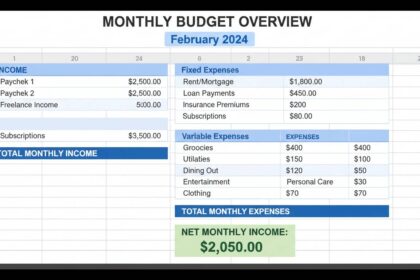

A well-designed budget spreadsheet transforms financial chaos into clarity. Most people abandon spreadsheets within weeks because they're either too complex to maintain or too simple to provide useful insights. The difference between a budget that fails and one that works comes down to structure, realistic category design, and intentional tracking habits. This guide walks you through building a spreadsheet that fits your actual spending patterns, provides actionable data, and takes less than 10 minutes per week to maintain.
Key Insights
- 65% of Americans don't use a budget
- Budgets that include savings goals see 40% higher success rates
- The average person tracks 3-5 categories; high performers track 8-12
- Spreadsheets outperform apps for customization
Why Most Budget Spreadsheets Fail
Most budget spreadsheets fail because they attempt to replicate professional accounting systems instead of mirroring how people actually spend money. A spreadsheet that requires you to categorize every coffee purchase under "Dining Out – Coffee Shops – Specialty – Under $5" becomes tedious within days. The result is either abandoned spreadsheets or numbers so aggregated they provide no actionable insight.
The fundamental problem is designing for perfection rather than sustainability. When you create a budget, you're building a tool you'll use during stressful moments—payday decisions, debt negotiations, holiday shopping. If the interface doesn't accommodate real life, the spreadsheet becomes a document you open once and never touch again.
Successful budgets share three characteristics: they match your spending behavior, they surface problems early enough to take action, and they require minimal effort to maintain. Everything below supports one of these three goals.
Building Your Foundation: Core Components
Every functional budget spreadsheet needs five elements, regardless of whether you're using Excel, Google Sheets, or Numbers.
Income Tracking
Your spreadsheet must capture all income sources with their frequency. This includes salary, side hustle payments,投资收益, and any irregular income. Record the gross amount and the expected date. For irregular income, use a rolling 3-month average rather than hoping for a specific amount. Most budget failures occur when people budget based on their best-case income rather than their actual average.
Category Structure
Create categories that reflect how you think about spending, not how accountants organize finances. If you consistently think about "gas and commute" as one mental category, don't split them into separate rows. The categories should map to your bank statements but group in ways that match your decision-making patterns.
Use a three-tier system: fixed essential expenses (rent, insurance, minimum payments), variable essential expenses (groceries, utilities, transportation), and discretionary spending (entertainment, dining out, hobbies). This tiered view immediately shows whether you have money available for optional purchases.
Transaction Recording
Record transactions at least weekly—daily if possible. The longer you wait, the more you forget. Record the date, amount, category, and a brief description. The description field seems unnecessary but becomes invaluable when reviewing spending patterns. "Coffee" is less useful than "Monday morning Latte" when you're trying to identify triggers for overspending.
Comparison Framework
Your spreadsheet needs a mechanism to compare actual spending against budgeted amounts. This can be as simple as columns showing "Budgeted," "Spent," and "Remaining," or as complex as variance percentages and trend analysis. Start simple and add complexity only when you naturally need the additional insight.
Savings Integration
The most successful budgets treat savings as a non-negotiable expense rather than whatever remains at month's end. Build savings contributions into your category structure as a line item with the same priority as rent. This approach consistently produces higher savings rates than "pay yourself last" methods.
Step-by-Step Setup
Step 1: Choose Your Platform
Google Sheets offers the best balance of accessibility and features. You can access it from any device, share it easily with partners, and use it offline through the mobile app. Excel provides more advanced calculation capabilities but requires either a subscription or desktop software. For most users, Google Sheets provides more than enough functionality.
Step 2: Set Up Your Column Structure
Create these columns in order from left to right: Date, Description, Category, Payment Method, Budgeted Amount, Actual Amount, Difference, Running Balance. This sequence mirrors how transactions occur and immediately shows impact on your bottom line.
The "Difference" column (Budgeted minus Actual) provides immediate feedback. Positive numbers mean you're under budget; negative numbers indicate overspending. The Running Balance column tracks your account position after each transaction.
Step 3: Build Your Summary Section
Above or beside your transaction list, create a summary dashboard with these elements: Total Income, Total Budgeted, Total Spent, Total Remaining, and Savings Rate. Use SUM formulas to automatically calculate these values from your transaction rows. The savings rate calculation (Savings ÷ Income × 100) should appear prominently—research consistently shows that visible savings tracking increases savings behavior.
Step 4: Create Category Tabs
For more complex budgets, create separate tabs for each major category. One tab tracks all transactions; category-specific tabs filter and summarize spending within that category. This structure works well when you need detailed analysis without cluttering your main view.
Categories That Match Real Spending
Generic budget templates use categories like "Food" and "Transportation" that sound reasonable but provide no actionable insight. Your categories should be specific enough to reveal patterns but broad enough to reduce recording time.
Recommended Essential Categories
- Housing (rent/mortgage, utilities, maintenance, insurance)
- Food (groceries, household supplies)
- Transportation (gas, public transit, rideshare, vehicle payment, maintenance)
- Healthcare (insurance, medications, appointments)
- Insurance (life, disability, umbrella policies)
- Minimum payments (credit cards, loans)
Recommended Discretionary Categories
- Dining out (separate from groceries)
- Entertainment (streaming, events, hobbies)
- Shopping (clothing, household items, gifts)
- Personal care (salon, gym, subscriptions)
- Travel (set aside monthly, use when trips occur)
The key principle is separating wants from needs within the same spending area. Groceries are a need; restaurant meals are a want. Combining them hides how much you're actually spending on non-essential food. When you see $600 in "Food" spending, you don't know if you're eating rice and beans or ordering takeout four nights per week.
Advanced Formulas and Automation
Once your basic structure works, these formulas transform your spreadsheet from a recording tool into an analytical system.
Conditional Formatting
Apply conditional formatting to the Difference column. Green for positive balances, red for negative values. This visual feedback takes less than a minute to set up and immediately highlights problems when you open the spreadsheet.
Format > Conditional Formatting > Color Scale > Red (negative) to Green (positive)
Running Balance Calculation
In your first data row, enter: =PreviousBalance + Income - Expense
Copy this formula down. The running balance shows your position after every transaction, preventing the shock of discovering you've overspent only at month's end.
Category Summaries
Use SUMIF to aggregate spending by category:
=SUMIF(Category_Range, "Dining Out", Amount_Range)
Create a summary table showing each category's total and percentage of total spending. Categories exceeding 20% of income warrant closer examination.
Monthly Comparison
Build separate sheets for each month. Use VLOOKUP or INDEX-MATCH to compare identical categories across months, revealing seasonal patterns and trend lines. Most spending categories fluctuate predictably—holiday spending spikes, summer travel increases, utility bills change with weather. Identifying these patterns lets you plan rather than react.
Common Mistakes and How to Avoid Them
Mistake 1: Over-Complex Category Systems
Creating 50+ categories ensures accuracy but destroys sustainability. Most users cannot realistically maintain this level of detail. Start with 10-15 categories and add complexity only when you identify a specific need.
Mistake 2: Budgeting Based on Ideal Spending
Many people budget what they think they should spend rather than what they actually spend. If you actually spend $800 on groceries, budgeting $400 doesn't change your behavior—it just makes your spreadsheet inaccurate. Set realistic budgeted amounts based on historical data, then adjust gradually.
Mistake 3: Ignoring Irregular Expenses
Annual subscriptions, quarterly insurance payments, and birthday gifts create budget chaos when they hit unexpectedly. Create a "Sinking Funds" category that sets aside small amounts monthly for predictable irregular expenses. When the bill arrives, you've already funded it.
Mistake 4: Not Reviewing Regularly
A budget you review only monthly provides historical documentation, not financial guidance. Open your spreadsheet at least weekly to track progress and catch overspending while you can still adjust. Daily review for 2-3 minutes during your morning routine builds awareness without becoming burdensome.
Making It Sustainable
The best spreadsheet design means nothing if you abandon it after three weeks. Build habits that support long-term use.
Time-Box Your Budgeting
Dedicate a specific time slot each week—Sunday evenings work well for many people. Treat this 15-minute block as non-negotiable. Review transactions, categorize new entries, and check progress toward goals. Consistency matters more than duration.
Track Cash Spending
Cash purchases disappear from digital records the moment you receive change. Create a simple system: keep a small notebook in your wallet or take a photo of receipts immediately. Enter these cash transactions within 24 hours.
Review Monthly
Schedule a monthly review of your summary dashboard. Calculate your savings rate, identify categories that exceeded budgets, and plan adjustments for the coming month. This 30-minute session prevents small problems from becoming budget-destroying crises.
Automate Where Possible
If your bank offers CSV export, download transactions weekly and paste them into your spreadsheet. Use sorting and filtering to quickly categorize new entries. The less manual data entry required, the more likely you'll maintain the habit.
When to Upgrade
Excel and Google Sheets handle personal budgets for most households. However, certain situations warrant specialized tools. If you own a small business and need to separate personal and business expenses, consider dedicated software. If you have complex investments with dividends, capital gains, and tax implications, financial planning software provides better tracking. If you're managing debt payoff with multiple creditors, debt snowball calculators built into specialized apps may accelerate your progress.
For most people, however, a well-maintained spreadsheet provides more than adequate functionality. The limiting factor is rarely the tool—it's the consistency of use.
Frequently Asked Questions
How do I start budgeting when I have no idea what I spend?
Track your spending without any budget limits for one month. Record every transaction as it occurs. At month's end, categorize and analyze your actual spending. Use these real numbers to establish your initial budget categories and amounts. You'll be surprised by where your money actually goes.
Should I budget down to the dollar?
Zero-based budgeting—giving every dollar a job—works well for some people but creates unnecessary stress for others. If rigid precision causes anxiety, allow a "Miscellaneous" category of 5-10% of income. The goal is awareness and control, not perfection.
How many categories should my budget have?
Start with 10-15 categories. Too few (under 5) hide spending patterns in aggregate categories. Too many (over 30) become tedious to maintain. Adjust based on your specific needs—if you spend significantly in a particular area, split it into subcategories.
What's the best way to handle irregular income?
Calculate your average monthly income using the past 12 months. Budget based on this average rather than your most recent paycheck. Keep a "buffer" category that accumulates in high-earning months and depletes during leaner periods. This smooths income volatility without creating financial stress.
How often should I update my budget spreadsheet?
Review it weekly at minimum—daily is better for building financial awareness. Enter transactions within 48 hours of occurring. The longer you wait, the less accurate your records become and the less actionable the data remains.
What should I do when I consistently overspend in a category?
Three options: reduce the budget to match your actual spending, change your behavior to meet the budget, or split the category to isolate the overspending subcategory. For example, if you consistently exceed your dining out budget, creating separate categories for "Fast Food" and "Sit-Down Restaurants" reveals exactly where the excess occurs.
Moving Forward
Building a budget spreadsheet that actually works requires the same investment as any useful skill: initial setup time, consistent practice, and iterative refinement. Start with the simple structure outlined here. Add complexity only when your situation demands it. Review regularly. Adjust as needed.
The spreadsheet itself provides no value—the decisions you make based on its information create your financial progress. Use it as a tool for awareness, not a mechanism for restriction. When your budget helps you accomplish your goals rather than punishing your spending, you'll naturally maintain the habit.
Begin this week. Set up the basic structure, record your transactions, and see what you learn about your money. The insight alone justifies the effort.