


Choosing the right crypto wallet is one of the most critical decisions you'll make when entering the cryptocurrency space. A crypto wallet doesn't actually store your digital assets—it holds your private keys, which are the mathematical proofs that prove you own your cryptocurrency. With over 420 million cryptocurrency users worldwide and billions worth of digital assets stolen annually through security breaches, the wallet you choose directly impacts the safety of your holdings.
Key Insights
- Hardware wallets reduce hack risk by 95% compared to hot wallets
- MetaMask dominates with over 30 million monthly active users
- The global crypto wallet market is projected to reach $35 billion by 2030
- Hardware wallets cost between $79-$349 but offer superior security
- Software wallets are free but require stronger personal security practices
This guide examines the best crypto wallets available in 2024, comparing security features, supported assets, fees, and user experience to help you make an informed decision.
What Is a Crypto Wallet and How Does It Work?
A cryptocurrency wallet is a digital tool that allows you to store, send, and receive cryptocurrencies like Bitcoin, Ethereum, and thousands of other digital assets. Understanding how these wallets function is essential before selecting one.
The Technology Behind Wallets
Every crypto wallet operates on a public-private key system. Your public key acts like a bank account number—share it freely so others can send you funds. Your private key is like your password—it must remain secret because anyone with access to it can control your funds. The wallet software generates and manages these keys, handling the cryptographic operations required to sign transactions.
When you send cryptocurrency, your wallet uses your private key to create a digital signature that proves you authorize the transaction. This signature is verified by the blockchain network before the transaction is confirmed. Without your private key, you cannot access your funds—making secure key storage the primary function of any wallet.
Hot Wallets vs. Cold Wallets
The fundamental distinction in crypto wallets revolves around their connection to the internet. Hot wallets remain connected to the internet, enabling convenient access for frequent trading and transactions. Cold wallets remain offline, storing your private keys in isolated environments that are virtually immune to online attacks.
Hot wallets include browser extensions, mobile apps, and desktop applications. They offer speed and convenience but expose your keys to potential online threats. Cold wallets, primarily hardware devices, keep your private keys physically disconnected from the internet. This air-gapped approach provides substantially stronger security for long-term storage.
Hardware Wallets: Maximum Security for Serious Investors
Hardware wallets provide the highest level of security for cryptocurrency storage. These physical devices store your private keys offline, making them resistant to malware, phishing attacks, and remote hacking attempts.
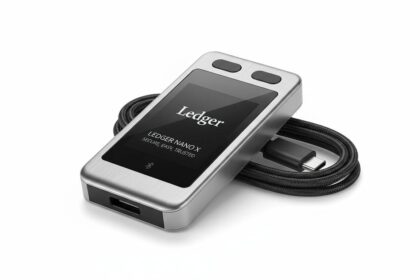
Ledger Nano X
The Ledger Nano X stands as the most popular hardware wallet worldwide, with over 6 million units sold. Its Bluetooth connectivity enables mobile use while maintaining security certification through a secure element chip.
| Feature | Specification |
|---|---|
| Price | $149 |
| Supported Assets | 5,500+ cryptocurrencies |
| Connectivity | USB-C, Bluetooth |
| Screen | Yes (OLED) |
| Battery | 8 hours active use |
The device uses a certified secure element (ST33J2M0) that stores private keys in tamper-resistant hardware. This means even if someone gains physical access to your device, extracting the keys requires sophisticated hardware attacks. The Ledger Live application provides an intuitive interface for managing portfolio, staking eligible assets, and purchasing crypto directly.
Best for: Investors holding significant value who want mobile accessibility without sacrificing security.
Trezor Model T
Trezor, created by SatoshiLabs in 2014, pioneered the hardware wallet concept. The Model T represents their flagship product, featuring a full-color touchscreen that simplifies setup and transaction verification.
| Feature | Specification |
|---|---|
| Price | $219 |
| Supported Assets | 1,000+ cryptocurrencies |
| Connectivity | USB-C |
| Screen | Yes (Full-color touchscreen) |
| Battery | No (powered by USB) |
The Model T's open-source design allows security researchers to audit the firmware, building trust through transparency. Its Shamir Backup feature enables splitting recovery seed into multiple shares, providing inheritance options and protection against loss or theft.
Best for: Security-conscious users who value open-source transparency and touchscreen convenience.
Ledger Nano S Plus
For users seeking hardware wallet security at a lower price point, the Ledger Nano S Plus offers compelling value. It shares the same secure element architecture as the Nano X but omits Bluetooth connectivity.
| Feature | Specification |
|---|---|
| Price | $79 |
| Supported Assets | 5,500+ cryptocurrencies |
| Connectivity | USB-C |
| Screen | Yes (128x64 OLED) |
| Battery | No |
This device handles the majority of user needs, including NFT management and DeFi interactions through Ledger Live. The lack of Bluetooth means it pairs exclusively with devices via USB cable, which some users actually prefer for security reasons.
Best for: Budget-conscious investors wanting hardware security without premium features.
Software Wallets: Convenience Meets Accessibility
Software wallets provide easy access to cryptocurrency for daily transactions, trading, and DeFi interactions. While they don't match hardware wallet security, modern software wallets incorporate robust protection measures.
MetaMask
MetaMask has become the de facto standard for Web3 interaction, serving as both a wallet and a gateway to decentralized applications. With over 30 million monthly active users, it dominates the browser extension and mobile wallet space.
| Feature | Specification |
|---|---|
| Price | Free |
| Supported Assets | Ethereum, EVM-compatible chains, custom networks |
| Platforms | Browser extension, iOS, Android |
| Hardware Wallet Support | Yes (Ledger, Trezor, Coinbase Wallet) |
| Key Storage | Device encrypted |
MetaMask's strength lies in its seamless integration with thousands of decentralized applications, enabling easy access to decentralized exchanges, lending platforms, NFT marketplaces, and blockchain games. The wallet allows users to manage multiple accounts, import hardware wallets for enhanced security, and connect to custom blockchain networks.
However, MetaMask's popularity makes it a frequent target for phishing attacks. Users must verify they are using the official domain and never share their secret recovery phrase. The wallet's mobile version includes biometric authentication, adding a layer of device-level security.
Best for: DeFi enthusiasts, NFT collectors, and users interacting with Ethereum-based applications.
Coinbase Wallet
Developed by Coinbase, one of the largest cryptocurrency exchanges in the US, Coinbase Wallet provides excellent integration with the Coinbase exchange while offering self-custody functionality.
| Feature | Specification |
|---|---|
| Price | Free |
| Supported Assets | Bitcoin, Ethereum, Solana, Polygon, + 100,000+ tokens |
| Platforms | Browser extension, iOS, Android |
| Exchange Integration | Seamless with Coinbase |
| Recovery Options | Cloud backup (iOS), Coinbase account recovery |
The wallet supports self-custody, meaning Coinbase cannot access your private keys. However, the integration allows easy fund transfers between the exchange and wallet. Its robust asset support spans major blockchains, and the DApp browser enables direct interaction with decentralized applications.
The key advantage for US users is regulatory compliance—Coinbase operates under strict US regulations, providing peace of mind regarding the wallet's legitimacy and security practices.
Best for: Coinbase users wanting seamless exchange-to-wallet transfers and broad asset support.
Trust Wallet
Owned by Binance, Trust Wallet supports the widest range of blockchains among major software wallets, making it ideal for users exploring multiple ecosystems.
| Feature | Specification |
|---|---|
| Price | Free |
| Supported Assets | 10 million+ assets across 100+ blockchains |
| Platforms | iOS, Android, Browser extension |
| NFT Support | Yes, native |
| Staking | Yes, built-in |
Trust Wallet's multi-chain support enables users to manage Bitcoin, Ethereum, Solana, and numerous other assets from a single interface. The integrated staking feature allows users to earn rewards on 70+ PoS cryptocurrencies directly within the wallet.
The wallet's built-in Web3 browser on mobile provides access to decentralized exchanges and DApps without leaving the application. However, the association with Binance may concern users seeking distance from centralized exchanges following regulatory actions against the exchange.
Best for: Multi-chain investors wanting to manage diverse portfolios across numerous blockchains.
Exodus
Exodus distinguishes itself through exceptional design and user experience, making cryptocurrency accessible to beginners while maintaining powerful features for experienced users.
| Feature | Specification |
|---|---|
| Price | Free (desktop); $9.99 mobile |
| Supported Assets | 260+ cryptocurrencies |
| Platforms | Desktop (Windows, Mac, Linux), Mobile (iOS, Android) |
| Exchange Integration | Built-in exchange widget |
| Design | Award-winning UI |
The desktop version offers a visually stunning interface with real-time portfolio tracking, charts, and integrated exchange functionality through ShapeShift and Changelly. The wallet automatically selects the best exchange rates when swapping assets.
Exodus stores private keys locally on the user's device, never on external servers. The wallet includes a recovery phrase export feature, enabling backup to hardware wallets for enhanced security.
Best for: Beginners seeking an intuitive interface and desktop-focused users valuing design aesthetics.
Critical Features to Evaluate in a Crypto Wallet
Selecting the right wallet requires understanding which features matter most for your specific use case and risk tolerance.
Security Architecture
The foundation of any wallet evaluation is its security architecture. Hardware wallets with secure element chips provide the strongest protection, storing private keys in tamper-resistant hardware. Software wallets should encrypt keys at rest and never transmit them over networks. Look for wallets offering two-factor authentication, biometric login on mobile, and multi-signature support for high-value holdings.
Supported Assets
Your wallet must support the cryptocurrencies you currently own or plan to acquire. Major software wallets support thousands of tokens across multiple blockchains, while hardware wallets vary in their asset coverage. If you hold niche altcoins, verify compatibility before committing to a wallet.
Recovery Options
Losing access to your wallet doesn't mean losing your funds—if you have your recovery phrase. Wallets generate 12 or 24-word recovery phrases during setup that can restore your keys on any compatible wallet. Some wallets offer additional recovery options, including social recovery features and multi-party computation that distributes key fragments across multiple devices.
User Experience
A wallet with excellent security means nothing if you cannot use it effectively. Consider the learning curve, interface responsiveness, and quality of customer support. Mobile accessibility matters for users who need frequent access, while desktop wallets may offer more robust features for portfolio management.
Network Fees
Software wallets generally cost nothing to download and use, though you pay network fees when transacting. Some wallets integrate with exchanges offering fee savings, while others pass network costs directly to users. Hardware wallets require upfront purchase but may save on fees for frequent traders through efficient transaction building.
Setting Up Your First Crypto Wallet
Proper wallet setup establishes the security foundation for your entire crypto journey. Taking time to configure settings correctly prevents future problems.
Step 1: Choose Your Wallet Type
Begin by determining whether you need a hot wallet, cold wallet, or both. A common approach uses a hardware wallet for primary savings and a software wallet for spending and DeFi activities. This separation limits exposure—if your hot wallet is compromised, your long-term holdings in the cold wallet remain secure.
Step 2: Download from Official Sources
Only download wallets from official websites or app stores. Phishing sites frequently mimic legitimate wallets, attempting to steal recovery phrases. Verify URLs carefully—MetaMask is always at metamask.io, Ledger at shop.ledger.com, and Trezor at trezor.io. Bookmark official pages to avoid phishing attempts.
Step 3: Create Your Recovery Phrase
During setup, your wallet generates a recovery phrase—typically 12 or 24 words. Write this phrase on paper and store it securely. Never store it digitally, as malware can capture it. Consider creating multiple copies stored in separate secure locations. Anyone with access to your recovery phrase controls your funds.
Step 4: Test Small Transactions
Before transferring significant value, send a small test transaction to verify everything works correctly. Send a small amount, confirm receipt, then send the remainder. This practice identifies address errors or wallet configuration issues before they cause permanent loss.
Step 5: Enable Security Features
Activate all available security features, including biometric authentication, two-factor verification, and auto-lock timers. Configure these settings according to your security needs—more stringent settings provide stronger protection but may reduce convenience.
Common Crypto Wallet Mistakes to Avoid
Even experienced cryptocurrency users make critical wallet mistakes that result in permanent fund loss. Understanding these pitfalls prevents costly errors.
| Mistake | Impact | Solution |
|---|---|---|
| Storing recovery phrase digitally | Malware steals phrase → complete fund loss | Write on paper, store physically |
| Using public WiFi for transactions | Man-in-the-middle attacks intercept data | Use VPN or private network |
| Not verifying addresses | Sending to wrong address → irreversible loss | Always verify first and last characters |
| Sharing recovery phrase | Others gain full wallet access | Never share, even with "support" |
| Not updating wallet software | Known vulnerabilities exploited | Install updates promptly |
| Falling for phishing emails | Credential theft → wallet compromise | Verify sender domains, never click links |
The cryptocurrency industry has lost over $3 billion to hacks and fraud in recent years, with wallet security failures accounting for a significant portion. Most losses are preventable through careful security practices.
How to Choose the Right Wallet for Your Needs
The best wallet depends on your specific situation—holding amount, technical experience, and intended use.
For Beginners ($500-$5,000)
Start with a reputable software wallet like Coinbase Wallet or Trust Wallet. These provide excellent onboarding, strong security features, and responsive customer support. The free cost eliminates financial barrier to entry, and their broad asset support accommodates future portfolio diversification.
For Serious Investors ($5,000-$50,000)
Hardware wallet becomes essential at this level. The Ledger Nano S Plus provides excellent value—$79 investment protects significantly larger holdings. Pair it with MetaMask or another software wallet for convenient transaction access while keeping primary holdings in cold storage.
For High-Net-Worth Holders ($50,000+)
Multiple hardware wallets with geographic distribution provide maximum security. Consider the Ledger Nano X for mobile convenience paired with Trezor Model T for open-source transparency. Implement multi-signature setups requiring multiple approvals for large transactions.
Frequently Asked Questions
What is the safest crypto wallet?
Hardware wallets are the safest option because they store private keys offline in secure hardware. The Ledger Nano X and Trezor Model T are widely considered the most secure options, using certified secure element chips that resist physical and software attacks.
Are free crypto wallets safe?
Free software wallets like MetaMask, Coinbase Wallet, and Trust Wallet are safe when used properly with appropriate security measures. However, they are inherently less secure than hardware wallets because keys remain on internet-connected devices. Use strong passwords, enable biometric authentication, and never share your recovery phrase.
Can crypto wallets be hacked?
Software wallets can be hacked through malware, phishing attacks, or exploits. Hardware wallets are nearly immune to remote hacking because private keys never leave the device. Physical theft of hardware wallets is also difficult because devices require PIN codes and can be recovered using backup phrases.
What happens if I lose my crypto wallet?
If you lose a hardware wallet, you can recover all funds using your recovery phrase on any compatible wallet. This is why securely storing your 12 or 24-word recovery phrase is absolutely critical. Without it, funds are permanently inaccessible.
Do I need a wallet if I keep crypto on an exchange?
While exchanges like Coinbase and Binance offer built-in wallets, self-custody wallets provide superior security and full control over your private keys. Exchange wallets are vulnerable to exchange hacks, insolvency, or account freezes. For amounts exceeding casual trading needs, dedicated wallets are recommended.
Which wallet supports the most cryptocurrencies?
Trust Wallet supports the widest range with over 10 million assets across 100+ blockchains. Ledger devices support over 5,500 cryptocurrencies through Ledger Live, while MetaMask supports all Ethereum Virtual Machine (EVM) compatible tokens and custom networks.
Conclusion
Selecting the right crypto wallet requires balancing security, convenience, and your specific cryptocurrency needs. For most users, a combination approach works best—hardware wallet for long-term holdings and software wallet for daily transactions.
The wallets covered in this guide represent the most trusted options in the industry, each excelling in different areas. Hardware wallets from Ledger and Trezor provide maximum security for substantial holdings. Software wallets like MetaMask, Coinbase Wallet, Trust Wallet, and Exodus offer varying strengths in DeFi integration, exchange compatibility, multi-chain support, and user experience.
Remember that wallet security ultimately depends on your practices. Even the most expensive hardware wallet provides no protection if you store your recovery phrase digitally or fall for phishing attacks. Take time to understand security fundamentals, enable all available protections, and never compromise on recovery phrase security.
Your cryptocurrency journey begins with securing your keys. Choose wisely, implement carefully, and your digital assets will remain safe as the ecosystem continues evolving.